Seminars of Interest
-
Join Jaclyn Schurman, program officer at the National Institute on Deafness and Other Communication Disorders, and other faculty members for a workshop in pursuing training grants. Please register by Monday, Sept. 26.
-
This hands-on workshop covers what makes digital math accessible for all learners, including major accessible math formats, accessible math tools, structuring workflows to deliver accessible math, and how digital math interacts with platforms like Canvas, Jupyter Notebook, MS Office documents, and webpages. See full description for free software requirements.

-
Get up to speed quickly on making your PowerPoint presentations accessible for everyone while meeting state and federal accessibility standards. In this hands-on workshop, we’ll begin with a brief overview of common accessibility challenges in PowerPoint and then dive straight into practical solutions.
-
The “AI Conversation Toolkit” helps graduate students and faculty navigate if, when, and how to use AI in research. In this workshop, we’ll walk students and faculty through the toolkit, which includes: understanding responsible tool use, evaluating tools, assessing risk, and communicating expectations.
-
Get up to speed quickly on the basics of making PDF documents accessible for all while meeting state and federal accessibility standards. For hands-on participation, you will need Adobe Acrobat Pro (not Acrobat Reader). U of I, UIS, and UIC faculty and staff can obtain Acrobat Pro free from the U of I Webstore: https://webstore.illinois.edu/shop/product.aspx?zpid=7227

-
Get up to speed quickly on making your Microsoft Word documents accessible for everyone while meeting state and federal accessibility standards. In this hands-on workshop, we’ll start with a brief overview of common accessibility challenges in Word and then jump right into practice.
-
Get up to speed quickly on the basics of making PDF documents accessible for all while meeting state and federal accessibility standards. For hands-on participation, you will need Adobe Acrobat Pro (not Acrobat Reader). U of I, UIS, and UIC faculty and staff can obtain Acrobat Pro free from the U of I Webstore: https://webstore.illinois.edu/shop/product.aspx?zpid=7227
-
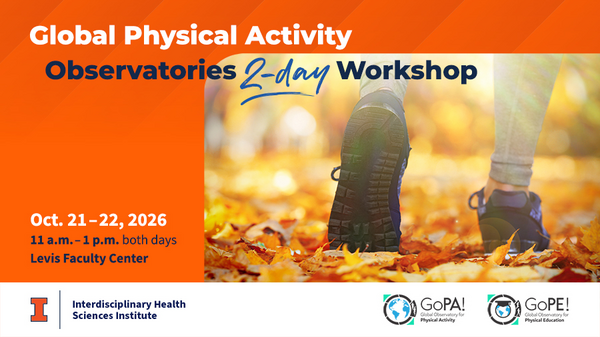
Students, researchers and community leaders are invited to connect with GoPA! and GoPE! leaders to explore global physical activity and physical education surveillance, research and policy. Learn how country cards track progress, gaps and opportunities worldwide, and help shape the next generation of monitoring tools for healthier, more active societies.
-
Join us Friday, Oct. 30, 1005 Beckman and the Beckman Atrium for a Core Facilities Showcase! We'll serve breakfast and lunch. The event will also feature lightning talks, "Ask the expert" booths, posters and tours of the core facilities.
-
Get up to speed on using the Pope Tech Canvas Accessibility Guide to make Canvas pages more accessible for everyone! In this hands-on workshop, we’ll start with an overview of the Pope Tech Canvas Accessibility Guide, how it functions, what the various errors, alerts, structural elements, and features mean, and how to fix these issues on a Canvas page.
-
Learn the accessibility requirements for making your Canvas courses accessible. This hands-on workshop will cover using the Canvas editor to create navigable pages, writing effective alt text description for images, charts, and graphs, ensuring readable color contrast, creating accessible tables and links, and using Canvas accessibility tools to fix common issues.
-
This hands-on workshop covers what makes digital math accessible for all learners, including major accessible math formats, accessible math tools, structuring workflows to deliver accessible math, and how digital math interacts with platforms like Canvas, Jupyter Notebook, MS Office documents, and webpages. See full description for free software requirements.

-
Get up to speed quickly on the basics of making PDF documents accessible for all while meeting state and federal accessibility standards. For hands-on participation, you will need Adobe Acrobat Pro (not Acrobat Reader). U of I, UIS, and UIC faculty and staff can obtain Acrobat Pro free from the U of I Webstore: https://webstore.illinois.edu/shop/product.aspx?zpid=7227

-
Get up to speed quickly on the basics of making PDF documents accessible for all while meeting state and federal accessibility standards. For hands-on participation, you will need Adobe Acrobat Pro (not Acrobat Reader). U of I, UIS, and UIC faculty and staff can obtain Acrobat Pro free from the U of I Webstore: https://webstore.illinois.edu/shop/product.aspx?zpid=7227

-
Get up to speed quickly on making your Microsoft Word documents accessible for everyone while meeting state and federal accessibility standards. In this hands-on workshop, we’ll start with a brief overview of common accessibility challenges in Word and then jump right into practice.

-
Get up to speed quickly on making your PowerPoint presentations accessible for everyone while meeting state and federal accessibility standards. In this hands-on workshop, we’ll begin with a brief overview of common accessibility challenges in PowerPoint and then dive straight into practical solutions.
-
Get up to speed on using the Pope Tech Canvas Accessibility Guide to make Canvas pages more accessible for everyone! In this hands-on workshop, we’ll start with an overview of the Pope Tech Canvas Accessibility Guide, how it functions, what the various errors, alerts, structural elements, and features mean, and how to fix these issues on a Canvas page.

-
This hands-on workshop covers what makes digital math accessible for all learners, including major accessible math formats, accessible math tools, structuring workflows to deliver accessible math, and how digital math interacts with platforms like Canvas, Jupyter Notebook, MS Office documents, and webpages. See full description for free software requirements.

-
Learn the accessibility requirements for making your Canvas courses accessible. This hands-on workshop will cover using the Canvas editor to create navigable pages, writing effective alt text description for images, charts, and graphs, ensuring readable color contrast, creating accessible tables and links, and using Canvas accessibility tools to fix common issues.
-
Get up to speed quickly on the basics of making PDF documents accessible for all while meeting state and federal accessibility standards. For hands-on participation, you will need Adobe Acrobat Pro (not Acrobat Reader). U of I, UIS, and UIC faculty and staff can obtain Acrobat Pro free from the U of I Webstore: https://webstore.illinois.edu/shop/product.aspx?zpid=7227
-
Get up to speed quickly on the basics of making PDF documents accessible for all while meeting state and federal accessibility standards. For hands-on participation, you will need Adobe Acrobat Pro (not Acrobat Reader). U of I, UIS, and UIC faculty and staff can obtain Acrobat Pro free from the U of I Webstore: https://webstore.illinois.edu/shop/product.aspx?zpid=7227

-
Get up to speed quickly on making your Microsoft Word documents accessible for everyone while meeting state and federal accessibility standards. In this hands-on workshop, we’ll start with a brief overview of common accessibility challenges in Word and then jump right into practice.
-
Get up to speed on using the Pope Tech Canvas Accessibility Guide to make Canvas pages more accessible for everyone! In this hands-on workshop, we’ll start with an overview of the Pope Tech Canvas Accessibility Guide, how it functions, what the various errors, alerts, structural elements, and features mean, and how to fix these issues on a Canvas page.