Indonesian Students Club
Tuesday, November 17, 2026
-
Get up to speed quickly on the basics of making PDF documents accessible for all while meeting state and federal accessibility standards. For hands-on participation, you will need Adobe Acrobat Pro (not Acrobat Reader). U of I, UIS, and UIC faculty and staff can obtain Acrobat Pro free from the U of I Webstore: https://webstore.illinois.edu/shop/product.aspx?zpid=7227
Wednesday, November 18, 2026
-
Get up to speed quickly on making your Microsoft Word documents accessible for everyone while meeting state and federal accessibility standards. In this hands-on workshop, we’ll start with a brief overview of common accessibility challenges in Word and then jump right into practice.
-
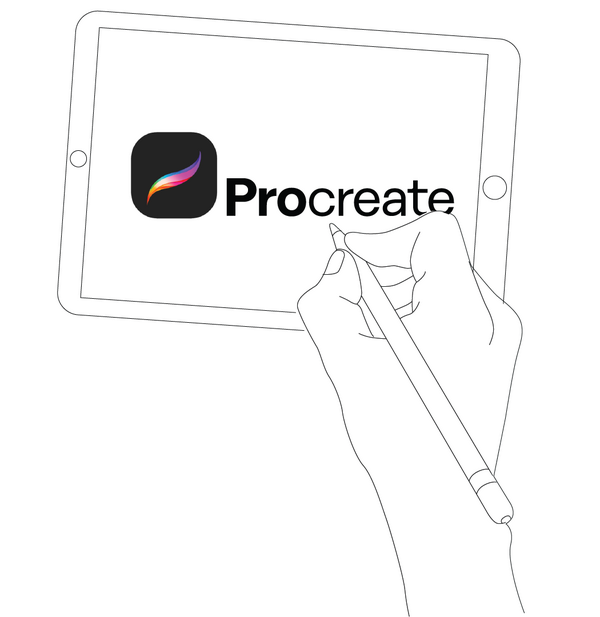
In this intermediate workshop, students who are already comfortable using basic app features will learn how to use representational strategies such as line weight, tone, and shading. Students will use the perspective and guide tools, and learn to create custom brushes.
Thursday, November 19, 2026
-
Get up to speed quickly on making your PowerPoint presentations accessible for everyone while meeting state and federal accessibility standards. In this hands-on workshop, we’ll begin with a brief overview of common accessibility challenges in PowerPoint and then dive straight into practical solutions.
-
Canvas open office hours
RecurringCITL's Instructional Support Team is hosting open office hours for Canvas support, training, and consultation. Please join us at https://illinois.zoom.us/j/85970622537?pwd=ZFlUZHk5K09ZQjZXZTN0MFFHcUFhZz09 with your Canvas questions.
Friday, November 20, 2026
-
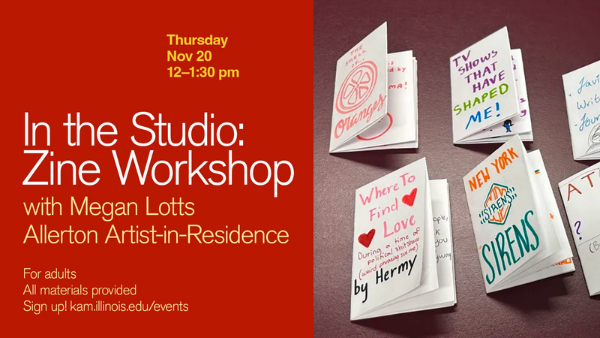
Join artist Megan Lotts as she leads you through the process of making a zine -- a small, handmade booklet that combines words, images, collage, drawing, and storytelling to share ideas and experiences in a creative way.
-
Get up to speed quickly on making your MS Excel spreadsheets accessible for everyone! In this hands-on workshop, we'll work together, hands-on, with practical strategies for naming tables, labeling header cells and workbook titles and sheets, creating accessible links, and working with colors and color testing tools.
Tuesday, November 24, 2026
-
Get up to speed on using the Pope Tech Canvas Accessibility Guide to make Canvas pages more accessible for everyone! In this hands-on workshop, we’ll start with an overview of the Pope Tech Canvas Accessibility Guide, how it functions, what the various errors, alerts, structural elements, and features mean, and how to fix these issues on a Canvas page.
Thursday, November 26, 2026
-
Canvas open office hours
RecurringCITL's Instructional Support Team is hosting open office hours for Canvas support, training, and consultation. Please join us at https://illinois.zoom.us/j/85970622537?pwd=ZFlUZHk5K09ZQjZXZTN0MFFHcUFhZz09 with your Canvas questions.
Tuesday, December 1, 2026
-
This hands-on workshop covers what makes digital math accessible for all learners, including major accessible math formats, accessible math tools, structuring workflows to deliver accessible math, and how digital math interacts with platforms like Canvas, Jupyter Notebook, MS Office documents, and webpages. See full description for free software requirements.
Thursday, December 3, 2026
-
Canvas open office hours
RecurringCITL's Instructional Support Team is hosting open office hours for Canvas support, training, and consultation. Please join us at https://illinois.zoom.us/j/85970622537?pwd=ZFlUZHk5K09ZQjZXZTN0MFFHcUFhZz09 with your Canvas questions.
-
Get up to speed quickly on creating accessible documents, presentations, and spreadsheets natively in the Google Workspace. In this hands-on workshop, you'll practice accessible authoring methods natively in Google Docs, Slides, and Sheets before using Grackle Suite to evaluate and remediate common Google document accessibility barriers.
Friday, December 4, 2026
-
Learn the accessibility requirements for making your Canvas courses accessible. This hands-on workshop will cover using the Canvas editor to create navigable pages, writing effective alt text description for images, charts, and graphs, ensuring readable color contrast, creating accessible tables and links, and using Canvas accessibility tools to fix common issues.
-
Get up to speed quickly on making your Microsoft Excel spreadsheets accessible for everyone! In this hands-on workshop, you’ll learn how to prevent reading and navigating order culprits, freeze columns and rows, hide unused columns and rows, delete empty rows between elements, create accessible links, and use the Accessibility Assistant.

Saturday, December 5, 2026
-
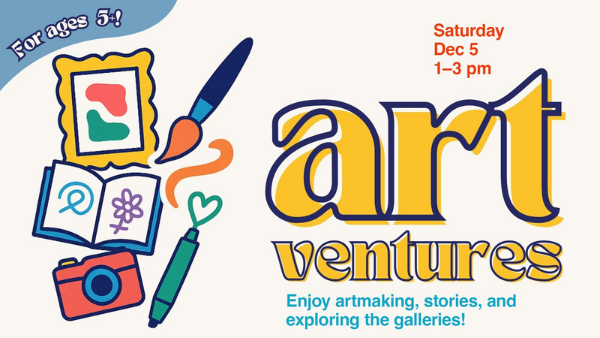
Join Krannert Art Museum educators and librarians from The Urbana Free Library for Artventures for Kids!—an interactive Saturday program designed for children (ages 5+) with their families and caregivers.
Tuesday, December 8, 2026
-
Get up to speed quickly on the basics of making PDF documents accessible for all while meeting state and federal accessibility standards. For hands-on participation, you will need Adobe Acrobat Pro (not Acrobat Reader). U of I, UIS, and UIC faculty and staff can obtain Acrobat Pro free from the U of I Webstore: https://webstore.illinois.edu/shop/product.aspx?zpid=7227
Thursday, December 10, 2026
-
Canvas open office hours
RecurringCITL's Instructional Support Team is hosting open office hours for Canvas support, training, and consultation. Please join us at https://illinois.zoom.us/j/85970622537?pwd=ZFlUZHk5K09ZQjZXZTN0MFFHcUFhZz09 with your Canvas questions.
Tuesday, December 15, 2026
-
Get up to speed quickly on making your PowerPoint presentations accessible for everyone while meeting state and federal accessibility standards. In this hands-on workshop, we’ll begin with a brief overview of common accessibility challenges in PowerPoint and then dive straight into practical solutions.
-
Get up to speed quickly on the basics of making PDF documents accessible for all while meeting state and federal accessibility standards. For hands-on participation, you will need Adobe Acrobat Pro (not Acrobat Reader). U of I, UIS, and UIC faculty and staff can obtain Acrobat Pro free from the U of I Webstore: https://webstore.illinois.edu/shop/product.aspx?zpid=7227
Thursday, December 17, 2026
-
Get up to speed quickly on making your Microsoft Word documents accessible for everyone while meeting state and federal accessibility standards. In this hands-on workshop, we’ll start with a brief overview of common accessibility challenges in Word and then jump right into practice.
-
Canvas open office hours
RecurringCITL's Instructional Support Team is hosting open office hours for Canvas support, training, and consultation. Please join us at https://illinois.zoom.us/j/85970622537?pwd=ZFlUZHk5K09ZQjZXZTN0MFFHcUFhZz09 with your Canvas questions.
Friday, December 18, 2026
-
Get up to speed on using the Pope Tech Canvas Accessibility Guide to make Canvas pages more accessible for everyone! In this hands-on workshop, we’ll start with an overview of the Pope Tech Canvas Accessibility Guide, how it functions, what the various errors, alerts, structural elements, and features mean, and how to fix these issues on a Canvas page.
Friday, March 26, 2027
-
ILLS is a general linguistics conference open to all subfields and aimed primarily at providing graduate and undergraduate students a friendly venue to present their work. The ILLS annual conference is proud to be entirely student-organized and operated by the Linguistics Student Organization at the University of Illinois at Urbana-Champaign.
Saturday, March 27, 2027
-
ILLS is a general linguistics conference open to all subfields and aimed primarily at providing graduate and undergraduate students a friendly venue to present their work. The ILLS annual conference is proud to be entirely student-organized and operated by the Linguistics Student Organization at the University of Illinois at Urbana-Champaign.