Illinois Events
Tuesday, September 29, 2026
-
Get up to speed on using the Pope Tech Canvas Accessibility Guide to make Canvas pages more accessible for everyone! In this hands-on workshop, we’ll start with an overview of the Pope Tech Canvas Accessibility Guide, how it functions, what the various errors, alerts, structural elements, and features mean, and how to fix these issues on a Canvas page.
Wednesday, September 30, 2026
Thursday, October 1, 2026
-
Documents must be proactively accessible for all students. This hands-on workshop will cover what to look for and several tools to help you find and fix issues. You’ll learn how to scan multiple document types for accessibility issues and remediate them.
Friday, October 2, 2026
-
Learn the accessibility requirements for making your Canvas courses accessible. This hands-on workshop will cover using the Canvas editor to create navigable pages, writing effective alt text description for images, charts, and graphs, ensuring readable color contrast, creating accessible tables and links, and using Canvas accessibility tools to fix common issues.
Tuesday, October 6, 2026
-
This hands-on workshop covers what makes digital math accessible for all learners, including major accessible math formats, accessible math tools, structuring workflows to deliver accessible math, and how digital math interacts with platforms like Canvas, Jupyter Notebook, MS Office documents, and webpages. See full description for free software requirements.
Wednesday, October 7, 2026
-
Get up to speed quickly on making your PowerPoint presentations accessible for everyone while meeting state and federal accessibility standards. In this hands-on workshop, we’ll begin with a brief overview of common accessibility challenges in PowerPoint and then dive straight into practical solutions.
Friday, October 9, 2026
Monday, October 12, 2026
-
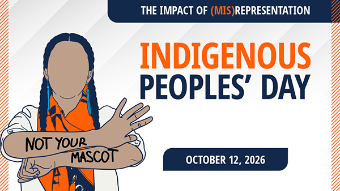
This year’s Indigenous Peoples’ Day examines how Native mascots, logos, and stereotypical imagery perpetuate colonial narratives and cause harm. Through programs and dialogue, we will challenge notions of “honor,” center Indigenous voices, and explore how self-representation can affirm the diversity, humanity, sovereignty, and contemporary presence of Indigenous peoples.
Tuesday, October 13, 2026
-
Get up to speed quickly on the basics of making PDF documents accessible for all while meeting state and federal accessibility standards. For hands-on participation, you will need Adobe Acrobat Pro (not Acrobat Reader). U of I, UIS, and UIC faculty and staff can obtain Acrobat Pro free from the U of I Webstore: https://webstore.illinois.edu/shop/product.aspx?zpid=7227
Thursday, October 15, 2026
Friday, October 16, 2026
Monday, October 19, 2026
-
Get up to speed quickly on making your Microsoft Word documents accessible for everyone while meeting state and federal accessibility standards. In this hands-on workshop, we’ll start with a brief overview of common accessibility challenges in Word and then jump right into practice.

Tuesday, October 20, 2026
-
Get up to speed quickly on the basics of making PDF documents accessible for all while meeting state and federal accessibility standards. For hands-on participation, you will need Adobe Acrobat Pro (not Acrobat Reader). U of I, UIS, and UIC faculty and staff can obtain Acrobat Pro free from the U of I Webstore: https://webstore.illinois.edu/shop/product.aspx?zpid=7227
Wednesday, October 21, 2026
Friday, October 23, 2026
Tuesday, October 27, 2026
Thursday, October 29, 2026
Friday, October 30, 2026
-
Get up to speed on using the Pope Tech Canvas Accessibility Guide to make Canvas pages more accessible for everyone! In this hands-on workshop, we’ll start with an overview of the Pope Tech Canvas Accessibility Guide, how it functions, what the various errors, alerts, structural elements, and features mean, and how to fix these issues on a Canvas page.
Tuesday, November 3, 2026
-
Learn the accessibility requirements for making your Canvas courses accessible. This hands-on workshop will cover using the Canvas editor to create navigable pages, writing effective alt text description for images, charts, and graphs, ensuring readable color contrast, creating accessible tables and links, and using Canvas accessibility tools to fix common issues.
-
This hands-on workshop covers what makes digital math accessible for all learners, including major accessible math formats, accessible math tools, structuring workflows to deliver accessible math, and how digital math interacts with platforms like Canvas, Jupyter Notebook, MS Office documents, and webpages. See full description for free software requirements.
Thursday, November 5, 2026
Friday, November 6, 2026
Tuesday, November 10, 2026
-
Get up to speed quickly on the basics of making PDF documents accessible for all while meeting state and federal accessibility standards. For hands-on participation, you will need Adobe Acrobat Pro (not Acrobat Reader). U of I, UIS, and UIC faculty and staff can obtain Acrobat Pro free from the U of I Webstore: https://webstore.illinois.edu/shop/product.aspx?zpid=7227
-
Immigration attorney Matthew Meltzer of Meltzer Hellrung, LLC, who specializes in employment-based immigration and works with entrepreneurs and companies, will share practical guidance and answer student questions. Whether you already have a startup, are exploring an idea, or simply want to understand your options for pursuing entrepreneurship in the U.S., this workshop is
Wednesday, November 11, 2026
Friday, November 13, 2026
Tuesday, November 17, 2026
-
Get up to speed quickly on the basics of making PDF documents accessible for all while meeting state and federal accessibility standards. For hands-on participation, you will need Adobe Acrobat Pro (not Acrobat Reader). U of I, UIS, and UIC faculty and staff can obtain Acrobat Pro free from the U of I Webstore: https://webstore.illinois.edu/shop/product.aspx?zpid=7227
Wednesday, November 18, 2026
-
Get up to speed quickly on making your Microsoft Word documents accessible for everyone while meeting state and federal accessibility standards. In this hands-on workshop, we’ll start with a brief overview of common accessibility challenges in Word and then jump right into practice.
Thursday, November 19, 2026
-
Get up to speed quickly on making your PowerPoint presentations accessible for everyone while meeting state and federal accessibility standards. In this hands-on workshop, we’ll begin with a brief overview of common accessibility challenges in PowerPoint and then dive straight into practical solutions.
Friday, November 20, 2026
Tuesday, November 24, 2026
-
Get up to speed on using the Pope Tech Canvas Accessibility Guide to make Canvas pages more accessible for everyone! In this hands-on workshop, we’ll start with an overview of the Pope Tech Canvas Accessibility Guide, how it functions, what the various errors, alerts, structural elements, and features mean, and how to fix these issues on a Canvas page.
Friday, November 27, 2026
Tuesday, December 1, 2026
-
This hands-on workshop covers what makes digital math accessible for all learners, including major accessible math formats, accessible math tools, structuring workflows to deliver accessible math, and how digital math interacts with platforms like Canvas, Jupyter Notebook, MS Office documents, and webpages. See full description for free software requirements.
Friday, December 4, 2026
-
Learn the accessibility requirements for making your Canvas courses accessible. This hands-on workshop will cover using the Canvas editor to create navigable pages, writing effective alt text description for images, charts, and graphs, ensuring readable color contrast, creating accessible tables and links, and using Canvas accessibility tools to fix common issues.
Tuesday, December 8, 2026
-
Get up to speed quickly on the basics of making PDF documents accessible for all while meeting state and federal accessibility standards. For hands-on participation, you will need Adobe Acrobat Pro (not Acrobat Reader). U of I, UIS, and UIC faculty and staff can obtain Acrobat Pro free from the U of I Webstore: https://webstore.illinois.edu/shop/product.aspx?zpid=7227
Thursday, December 10, 2026
Friday, December 11, 2026
Tuesday, December 15, 2026
-
Get up to speed quickly on the basics of making PDF documents accessible for all while meeting state and federal accessibility standards. For hands-on participation, you will need Adobe Acrobat Pro (not Acrobat Reader). U of I, UIS, and UIC faculty and staff can obtain Acrobat Pro free from the U of I Webstore: https://webstore.illinois.edu/shop/product.aspx?zpid=7227
Thursday, December 17, 2026
-
Get up to speed quickly on making your Microsoft Word documents accessible for everyone while meeting state and federal accessibility standards. In this hands-on workshop, we’ll start with a brief overview of common accessibility challenges in Word and then jump right into practice.
Friday, December 18, 2026
-
Get up to speed on using the Pope Tech Canvas Accessibility Guide to make Canvas pages more accessible for everyone! In this hands-on workshop, we’ll start with an overview of the Pope Tech Canvas Accessibility Guide, how it functions, what the various errors, alerts, structural elements, and features mean, and how to fix these issues on a Canvas page.