Center for Innovation in Teaching & Learning
receive our monthly CITL and our AI Horizons newsletters.
**Many workshops can be applied towards the CITL teaching certificates. Learn more about our teaching certificates.
Wednesday, October 14, 2026
-
This workshop brings together educators across campus to celebrate teaching, share effective practices, and build community. Participants will engage in storytelling, collaborative reflection, and peer learning to inspire continued growth and innovation in teaching.
Friday, October 16, 2026
-
Examines how course structures create executive-function demands and introduces scaffolding strategies that reduce cognitive load without sacrificing rigor.
-
This presentation will introduce NautilIA, an interactive generative-AI roleplay game build through Google AI Studio designed to support French language learning through immersive, voice-based interaction. The presentation will first showcase the platform and its main features, then discuss how NautilIA was integrated into a French as a Foreign Language course.
Monday, October 19, 2026
-
Get up to speed quickly on making your Microsoft Word documents accessible for everyone while meeting state and federal accessibility standards. In this hands-on workshop, we’ll start with a brief overview of common accessibility challenges in Word and then jump right into practice.
Tuesday, October 20, 2026
-
This workshop explores the role of peer observation in supporting well-delivered teaching. Participants will examine strategies for observing instructional practices, providing constructive feedback, and engaging in reflective dialogue to strengthen teaching effectiveness.
-
Get up to speed quickly on the basics of making PDF documents accessible for all while meeting state and federal accessibility standards. For hands-on participation, you will need Adobe Acrobat Pro (not Acrobat Reader). U of I, UIS, and UIC faculty and staff can obtain Acrobat Pro free from the U of I Webstore: https://webstore.illinois.edu/shop/product.aspx?zpid=7227
Wednesday, October 21, 2026
-
CITL's Master Course in Online Teaching (MCOT) is a deep dive into online teaching strategies that extends what was presented during previous teaching academies. Prior participation in an instructional development series is not required but professional experience with university level instruction is strongly encouraged.
Thursday, October 22, 2026
-
The three esteemed panelists will deliver lightning-round presentations centered around the topic of "AI and Sustainability." The three presentations will be followed by a moderated Q & A. The topics will include, but not be limited to: sustainable farming with AI; AI/data centers and water consumption; planetary boundaries and use of AI, environmental economics, and more.
Friday, October 23, 2026
-
Sometimes the world arrives in the classroom before we do, and it can shape how students engage, participate, and make sense of their learning. This workshop invites faculty to explore how current events influence classroom dynamics.
-
Dr. Cromley will present on two studies comparing writing with Word vs. ChatGPT. Data were collected on during-reading and during-writing processes, essay scores, and learning posttests. The results of these studies will be presented and examined with a critical eye.
Wednesday, October 28, 2026
-
CITL's Master Course in Online Teaching (MCOT) is a deep dive into online teaching strategies that extends what was presented during previous teaching academies. Prior participation in an instructional development series is not required but professional experience with university level instruction is strongly encouraged.
Thursday, October 29, 2026
-
As faculty navigate writing instruction in the AI era, how can instructors ensure students develop and strengthen writing skills on their own, without the assistance of AI tools to complete assignments? Learn about Fall 2026 pilot project incorporating four writing assignments at the CBTF for a large online, non-majors section of JOUR 200: Introduction to Journalism.
Friday, October 30, 2026
-
Get up to speed on using the Pope Tech Canvas Accessibility Guide to make Canvas pages more accessible for everyone! In this hands-on workshop, we’ll start with an overview of the Pope Tech Canvas Accessibility Guide, how it functions, what the various errors, alerts, structural elements, and features mean, and how to fix these issues on a Canvas page.
Tuesday, November 3, 2026
-
Learn the accessibility requirements for making your Canvas courses accessible. This hands-on workshop will cover using the Canvas editor to create navigable pages, writing effective alt text description for images, charts, and graphs, ensuring readable color contrast, creating accessible tables and links, and using Canvas accessibility tools to fix common issues.
-
Annual Faculty Retreat: Collaborative Session 2: Teaching Responsible Choices in an AI-Enabled World
This workshop explores how we can help students make thoughtful and responsible choices about its use. Together, we will consider questions of ethics, transparency, authorship, sustainability, and the role of human judgment in an increasingly AI-enabled world.
-
This hands-on workshop covers what makes digital math accessible for all learners, including major accessible math formats, accessible math tools, structuring workflows to deliver accessible math, and how digital math interacts with platforms like Canvas, Jupyter Notebook, MS Office documents, and webpages. See full description for free software requirements.
Wednesday, November 4, 2026
-
CITL's Master Course in Online Teaching (MCOT) is a deep dive into online teaching strategies that extends what was presented during previous teaching academies. Prior participation in an instructional development series is not required but professional experience with university level instruction is strongly encouraged.
Friday, November 6, 2026
-
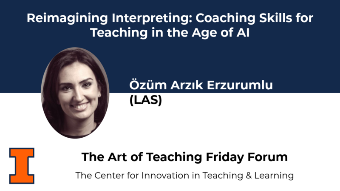
Özüm Arzık Erzurumlu leads a conversation on integrating coaching skills into everyday teaching practice, drawing on her work as an ICF-certified professional coach and her research on coaching frameworks in interpreter education. A set of practical tools are introduced for participants to apply to different teaching contexts.
-
Addresses ambiguity in group work and equips faculty with strategies for clarifying expectations, structuring collaboration, and offering flexible participation options.
Tuesday, November 10, 2026
-
Get up to speed quickly on the basics of making PDF documents accessible for all while meeting state and federal accessibility standards. For hands-on participation, you will need Adobe Acrobat Pro (not Acrobat Reader). U of I, UIS, and UIC faculty and staff can obtain Acrobat Pro free from the U of I Webstore: https://webstore.illinois.edu/shop/product.aspx?zpid=7227
Wednesday, November 11, 2026
-
CITL's Master Course in Online Teaching (MCOT) is a deep dive into online teaching strategies that extends what was presented during previous teaching academies. Prior participation in an instructional development series is not required but professional experience with university level instruction is strongly encouraged.
Friday, November 13, 2026
-
This presentation provides an overview of how AI is influencing work, employment, HRM, and labor relations. It considers emerging opportunities and challenges for workers and organizations, with attention to changing job tasks, employment practices, workplace governance, and the evolving relationship between technology and work.
Tuesday, November 17, 2026
-
Get up to speed quickly on the basics of making PDF documents accessible for all while meeting state and federal accessibility standards. For hands-on participation, you will need Adobe Acrobat Pro (not Acrobat Reader). U of I, UIS, and UIC faculty and staff can obtain Acrobat Pro free from the U of I Webstore: https://webstore.illinois.edu/shop/product.aspx?zpid=7227
Wednesday, November 18, 2026
-
Get up to speed quickly on making your Microsoft Word documents accessible for everyone while meeting state and federal accessibility standards. In this hands-on workshop, we’ll start with a brief overview of common accessibility challenges in Word and then jump right into practice.
Thursday, November 19, 2026
-
Get up to speed quickly on making your PowerPoint presentations accessible for everyone while meeting state and federal accessibility standards. In this hands-on workshop, we’ll begin with a brief overview of common accessibility challenges in PowerPoint and then dive straight into practical solutions.
Tuesday, November 24, 2026
-
Get up to speed on using the Pope Tech Canvas Accessibility Guide to make Canvas pages more accessible for everyone! In this hands-on workshop, we’ll start with an overview of the Pope Tech Canvas Accessibility Guide, how it functions, what the various errors, alerts, structural elements, and features mean, and how to fix these issues on a Canvas page.
Thursday, November 26, 2026
Friday, November 27, 2026
Tuesday, December 1, 2026
-
This hands-on workshop covers what makes digital math accessible for all learners, including major accessible math formats, accessible math tools, structuring workflows to deliver accessible math, and how digital math interacts with platforms like Canvas, Jupyter Notebook, MS Office documents, and webpages. See full description for free software requirements.
Thursday, December 3, 2026
-
In this presentation prof. Agate will share how the assignments in RST 460 are structured and the reasoning behind the design, and will also share some preliminary data about students’ experience with the AI integration into the event planning process: what they are finding useful, confusing, or surprising.
-
Get up to speed quickly on creating accessible documents, presentations, and spreadsheets natively in the Google Workspace. In this hands-on workshop, you'll practice accessible authoring methods natively in Google Docs, Slides, and Sheets before using Grackle Suite to evaluate and remediate common Google document accessibility barriers.
Friday, December 4, 2026
-
Learn the accessibility requirements for making your Canvas courses accessible. This hands-on workshop will cover using the Canvas editor to create navigable pages, writing effective alt text description for images, charts, and graphs, ensuring readable color contrast, creating accessible tables and links, and using Canvas accessibility tools to fix common issues.
-
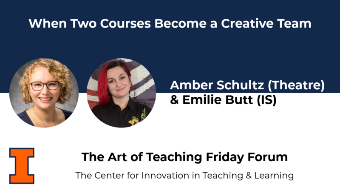
In this case study, we will share how we have refined our model for bringing students from multiple disciplines together, breaking down silos between courses, and creating a productive give-and-take throughout the design process. We will discuss what students gain from working across disciplines and explain how we collaborate as faculty while maintaining distinct courses.
Tuesday, December 8, 2026
-
Get up to speed quickly on the basics of making PDF documents accessible for all while meeting state and federal accessibility standards. For hands-on participation, you will need Adobe Acrobat Pro (not Acrobat Reader). U of I, UIS, and UIC faculty and staff can obtain Acrobat Pro free from the U of I Webstore: https://webstore.illinois.edu/shop/product.aspx?zpid=7227
Tuesday, December 15, 2026
-
Get up to speed quickly on making your PowerPoint presentations accessible for everyone while meeting state and federal accessibility standards. In this hands-on workshop, we’ll begin with a brief overview of common accessibility challenges in PowerPoint and then dive straight into practical solutions.
-
Get up to speed quickly on the basics of making PDF documents accessible for all while meeting state and federal accessibility standards. For hands-on participation, you will need Adobe Acrobat Pro (not Acrobat Reader). U of I, UIS, and UIC faculty and staff can obtain Acrobat Pro free from the U of I Webstore: https://webstore.illinois.edu/shop/product.aspx?zpid=7227
Thursday, December 17, 2026
-
Get up to speed quickly on making your Microsoft Word documents accessible for everyone while meeting state and federal accessibility standards. In this hands-on workshop, we’ll start with a brief overview of common accessibility challenges in Word and then jump right into practice.
Friday, December 18, 2026
-
Get up to speed on using the Pope Tech Canvas Accessibility Guide to make Canvas pages more accessible for everyone! In this hands-on workshop, we’ll start with an overview of the Pope Tech Canvas Accessibility Guide, how it functions, what the various errors, alerts, structural elements, and features mean, and how to fix these issues on a Canvas page.
Thursday, December 24, 2026
Friday, December 25, 2026
Monday, December 28, 2026
Tuesday, December 29, 2026
Wednesday, December 30, 2026
Thursday, December 31, 2026
Friday, January 1, 2027
Monday, January 18, 2027
Wednesday, January 27, 2027
-
This workshop explores how faculty can help students evaluate evidence, navigate uncertainty, recognize misinformation, and develop the habits of inquiry and judgment needed to thrive in a rapidly changing information landscape.
Friday, March 5, 2027
-
As the year comes to a close, this retreat provides an opportunity to reconnect, reflect, and celebrate what we have learned together. Faculty will share ideas, experiences, and practices that emerged throughout the series, while exploring how new partnerships, insights, and conversations can continue to shape teaching and learning across campus in the years ahead.
Monday, May 31, 2027
Friday, June 18, 2027
receive our monthly CITL and our AI Horizons newsletters.